The routing engine behind every CallFlow number
Intelligent call routing that picks the right destination for every call
Every inbound call is placed by the same decision: which destinations are open and have capacity right now, how the traffic should be shared between them, and what to do when the chosen one does not pick up. CallFlow makes each of those a setting you control per destination, and shows you the live counts it is working from.
Free account · no subscription or contract · usage drawn from a prepaid wallet
- Priority tiers: tier 2 only sees calls tier 1 could not take
- Weights for the share of calls inside a tier
- Concurrent, hourly, daily and total caps that reset on their own
- Daily or dated schedules per destination
- Sequential or simultaneous ringing with no-answer failover
- AI Routing and a hold queue for when everyone is busy
How a call is placed
One decision, made the same way on every call
The router never guesses. It walks the destinations in priority order, removes the ones that cannot take the call, shares what is left by weight, and starts again from the top if nobody answers.
- 1
Start at priority tier 1
Lower tier numbers are tried first. A tier is only skipped when every destination in it is unavailable.
- 2
Remove what cannot answer
Destinations that are switched off, outside their schedule, at their concurrent cap or at an hourly, daily or total cap are dropped for this call.
- 3
Share the rest by weight
Weights give the long-run split. Each weight is scaled down as the destination nears its caps or receives a burst in the same second, and AI Routing trims destinations that have stopped answering.
- 4
Ring, then fail over
The chosen destination rings for the campaign's ring time. No answer means the next eligible destination, never one already tried on this call. When nothing is left, the caller can hold in the queue.
Routing controls
Every rule is a field on the destination
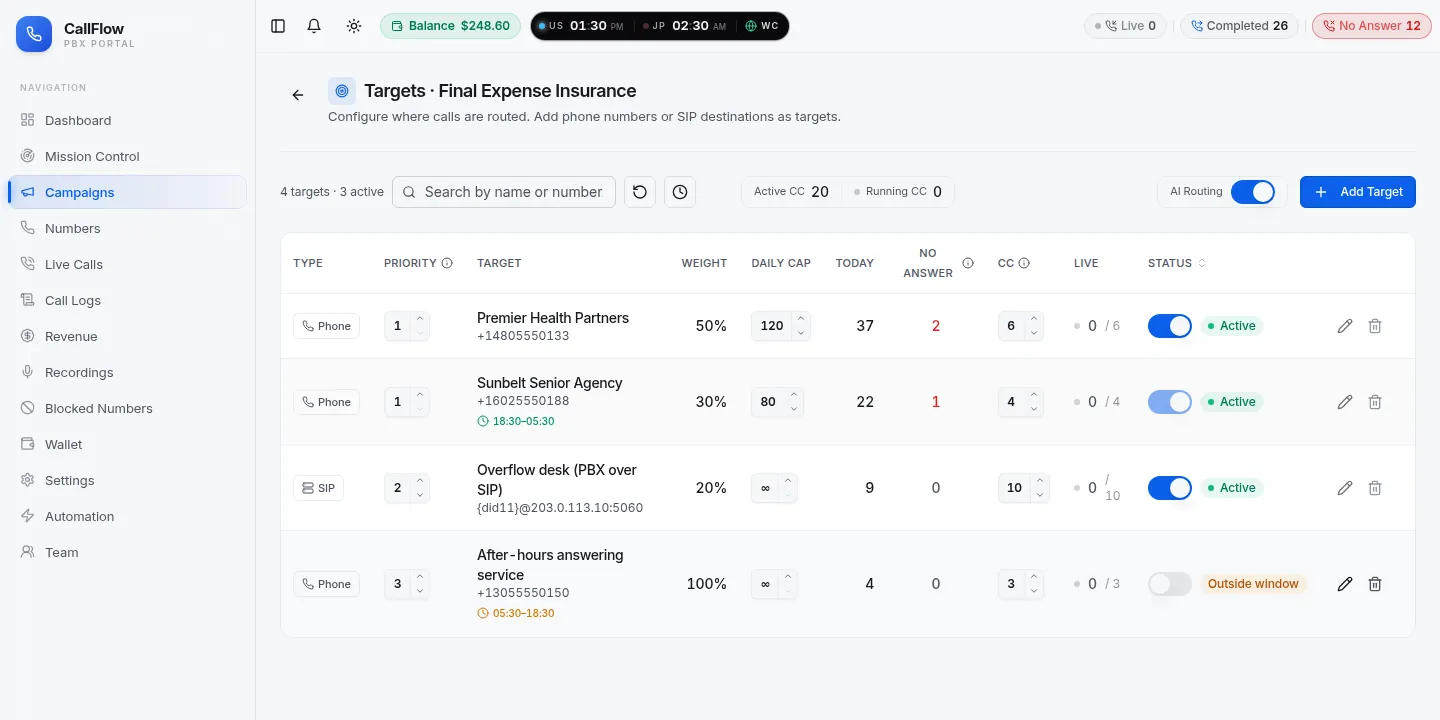
There is no rules language to learn. Each destination carries its own settings, and the router reads them on every call, so a change takes effect on the next ring.
Priority tiers
Number the tiers; the lowest number is tried first. Keep an overflow desk or a backup buyer in tier 2 and it only ever receives calls tier 1 could not take.
Weights
Within a tier, weights set the share: 50/30/20 across three destinations, or 100/0 to hold one in reserve. Weights only matter between destinations that are eligible right now.
Concurrent-call caps
The number of calls a destination can be on at once. The router counts live legs, so a two-line office is never sent a third call that would ring out.
Hourly, daily and total caps
Volume limits that reset automatically, plus a total cap that closes a destination for good once it has received the agreed number of calls.
Schedules
Daily opening hours or a dated start and end per destination. Windows that run past midnight are supported, so an evening-to-morning shift is one window, not two.
Sequential or simultaneous
Ring destinations one after another in priority order, or ring a group of agents at the same time and connect whoever picks up first.
No-answer failover
A destination that does not pick up costs the caller seconds, not the call
In sequential mode the router keeps the caller on the line and moves on. Destinations already tried on the call are skipped, so a flapping line cannot be rung twice.
- 0 s – 25 sRings Buyer 1 (tier 1)
- 25 sNo answer
- 25 s – 31 sRings Buyer 2 (tier 1)
- 31 sBusy
- 31 s – 43 sRings overflow desk (tier 2)
- 43 sAnswered
- 43 s – 60 sTalking (continues)
Sequential ringing
Best for buyers, branches and on-call rotas. One destination rings at a time for the ring time you set; busy, no answer and failure all move the call to the next eligible destination, tier by tier.
Simultaneous ringing
Best for a team of agents in the browser. An extension group rings every member at once and connects the first to answer; the others stop ringing immediately.
Capacity-aware weighting
A plain weighted split ignores how full a destination already is. CallFlow scales each weight by the destination's remaining headroom, so a buyer two calls from their daily cap gradually receives less, and a burst of calls landing in the same second is spread instead of being stacked on one line.
- Weights shrink as a destination approaches its concurrent or daily cap
- Same-second bursts are spread across eligible destinations
- A destination at any cap is removed outright, never merely down-weighted
- Counts are live, so the targets page shows the same numbers the router used
AI Routing: learn from who answers
With AI Routing switched on for a campaign, the router watches each destination's recent outcomes and lowers the weight of destinations that have stopped answering. The change is gradual, it only begins once there is enough recent history to mean something, and it reverses as soon as the destination answers again.
- Only confirmed no-answers count; system timeouts never penalise a destination
- A buyer with a phone problem loses traffic for minutes, not days
- Priority tiers and caps are still honoured; AI Routing only adjusts weights
- Switch it on per campaign and leave the rest of the configuration alone
Destinations
Four kinds of destination, one set of rules
Weights, tiers, caps and schedules apply the same way whatever the destination is, so a campaign can mix a buyer's phone line, a PBX trunk and a browser team.
Phone number
Any mobile or landline. The simplest destination and the usual starting point.
SIP destination
Your own PBX, contact-centre platform or dialer, by host and port, with the dialled number passed through.
Agent extension
A team member answering in the browser with a headset, with their own calls and recordings only.
Extension group
Several agents rung at once; the first to answer takes the call. Groups and single agents can share a campaign.
Getting the number itself is covered on the toll-free call forwarding page. If the destinations are paying buyers, the pay-per-call tracking page covers duplicate rules, buyer logins and reports.
Mission Control
Watch the router work
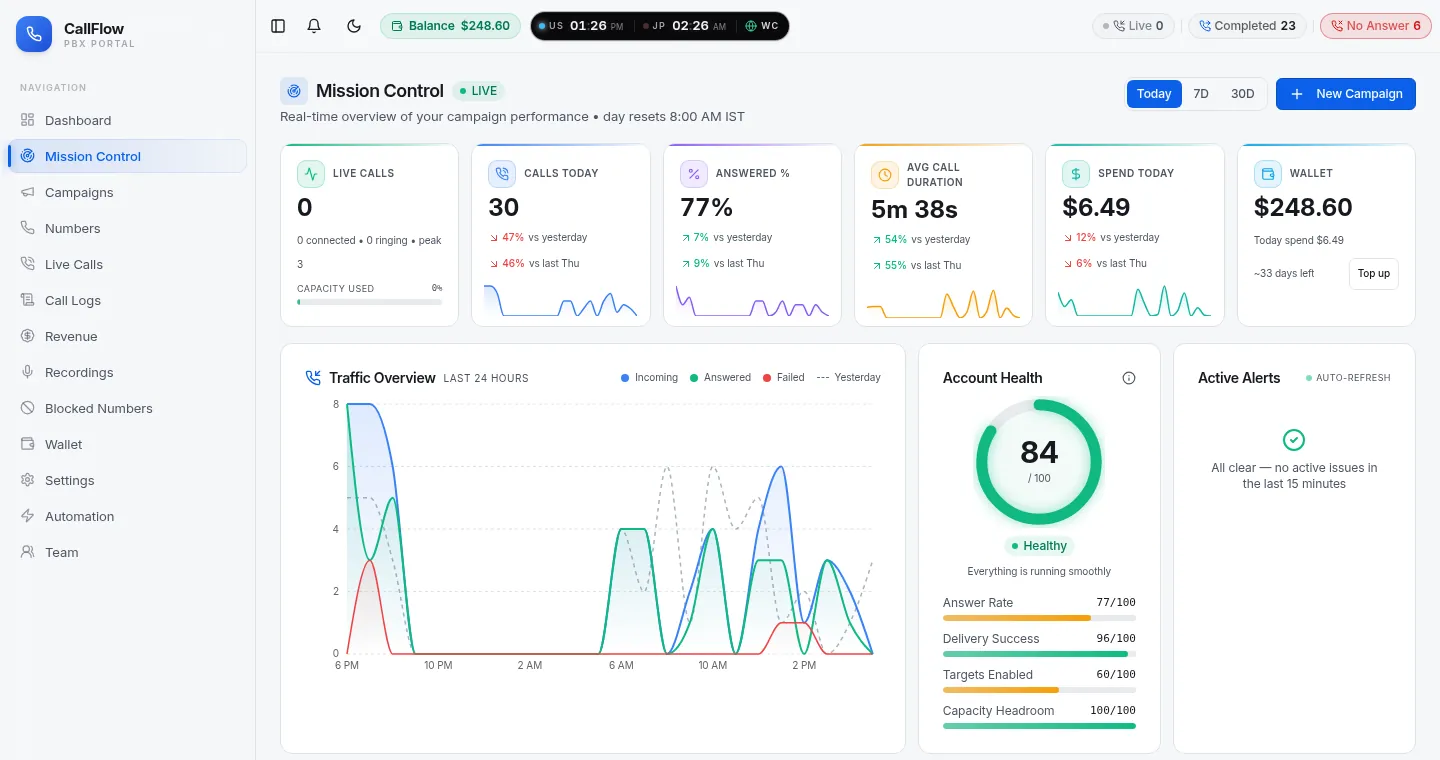
Mission Control is the live picture: calls connected and ringing, capacity in use, today's answer rate against yesterday and last week, and alerts when something needs attention, so a routing change can be checked within a minute of making it.
- Live calls: connected, ringing, today's peak and capacity in use
- Calls today, answer rate and average call length, compared with yesterday and last week
- A 24-hour chart of incoming, answered and failed calls
- An account health score with active alerts, plus a Live Calls page for the call-by-call view
Pause a destination from the targets page and the next call is placed without it; there is nothing to publish or restart.
FAQ
Call routing questions
How the router behaves in the situations people ask about most.
How does CallFlow decide where a call goes?
The router looks at the campaign's targets in priority order. Within a priority tier it removes targets that are disabled, closed for the hour, at their concurrent cap or at a daily cap, then shares the call between the rest by weight. Weights are scaled down as a target approaches its caps or receives a burst of calls in the same second, so no single destination is flooded.
What is the difference between weight and priority?
Priority decides the order tiers are tried: tier 1 gets every call it has capacity for, tier 2 only sees calls tier 1 could not take, and so on. Weight decides the share of calls between targets in the same tier, for example 60/40 between two buyers.
What happens when a target does not answer?
In sequential mode the call moves to the next eligible target after the campaign's ring time, skipping any target already tried on that call. Each attempt is logged, and the call record shows the destination that finally answered and how long the caller waited.
What does AI Routing change?
With AI Routing on, the router looks at each target's recent outcomes and reduces the weight of destinations that have stopped answering. The reduction is gradual, starts only once there is enough history to be meaningful and recovers as soon as the target answers again, so a buyer with a phone problem loses traffic for minutes rather than days.
Can calls wait in a queue when everyone is busy?
Yes. When every target is at capacity, the caller hears hold music while the campaign keeps looking for a free destination; the call connects the moment one opens up and the time on hold is itemised on the call record.
Can I route to my own PBX or to agents in a browser?
A target can be a phone number, a SIP destination on your own PBX or dialer, an agent extension that rings in the browser, or an extension group that rings several agents at once. All four take part in the same weights, tiers and caps.
From the blog
Guides on intelligent call routing
Longer reads from the CallFlow team on the same topic: setup walkthroughs, pitfalls and worked examples.
- Call routing: strategies, rules, and setup guide
- Weighted call routing: setup, use cases, and pitfalls
- Priority call routing: route VIP and urgent calls first
- Failover call forwarding: build redundant inbound routing
- Schedule-based call routing: setup, options, examples
- Daily and concurrent call caps: protect buyers and keep routing fair
More from CallFlow
The rest of the platform
Call Forwarding Portal
Numbers, campaigns, live calls, recordings, billing and team access in one signed-in portal.
OverviewToll-Free Call Forwarding
Pick an 800-series number and forward it to phones, SIP trunks or browser agents, with hours, caps and failover per destination.
Learn morePay-Per-Call Tracking
A tracking number per source, buyers with caps and weights, duplicate rules, buyer logins and reports that send themselves.
Learn moreIVR Call Forwarding
A custom prompt and one required key press that keeps robocalls and auto-dialers away from your team and your buyers.
Learn moreSee it with your own numbers
Open a free account and set up intelligent call routing in a few minutes, or book a short demo and we will walk through your routing with you.