Toll-free numbers · 800 · 833 · 844 · 855 · 866 · 877 · 888
Toll-free call forwarding that your team can actually manage
Pick a toll-free number from live inventory, attach it to a campaign and forward its calls to the phones, SIP trunks or browser agents that should answer, each with its own opening hours, capacity and failover. The same portal shows the calls as they ring, keeps the recordings and itemises every charge.
Free account · no subscription or contract · usage drawn from a prepaid wallet
- Search live inventory by prefix and by the digits you want
- Forward to any phone, your PBX over SIP, or agents in a browser
- Opening hours, concurrent-call caps and failover per destination
- Spam Shield and a press-a-digit screen keep auto-dialers out
- Recordings kept ten days, then deleted automatically
- Prepaid wallet with itemised charges; release a number any time
What you get
A toll-free number plus everything needed to run it
The number is the easy part. These are the controls that decide whether the calls actually reach someone who can help.
Live number search
Filter the inventory by toll-free prefix and by digits the number must contain. Numbers attach to your account the moment the order completes.
Three kinds of destination
A campaign can forward to an ordinary phone, to your PBX or dialer over SIP, or to agents answering in their browser, in any mix.
Hours and failover
Each destination has its own daily or dated schedule and a ring time. A closed or unanswered destination is skipped and the next one rings.
Call Protection
STIR/SHAKEN checks, per-caller rate limits, a block list with reasons, optional VoIP and international blocking, and an IVR challenge.
Live calls and call logs
Mission Control shows calls ringing and talking right now; call logs keep the caller, the number dialled, the destination, duration and outcome.
Wallet billing, no contract
Fund a wallet and watch it draw down call by call in the transaction history. There is no subscription, and numbers are released from the portal.
Inside the portal
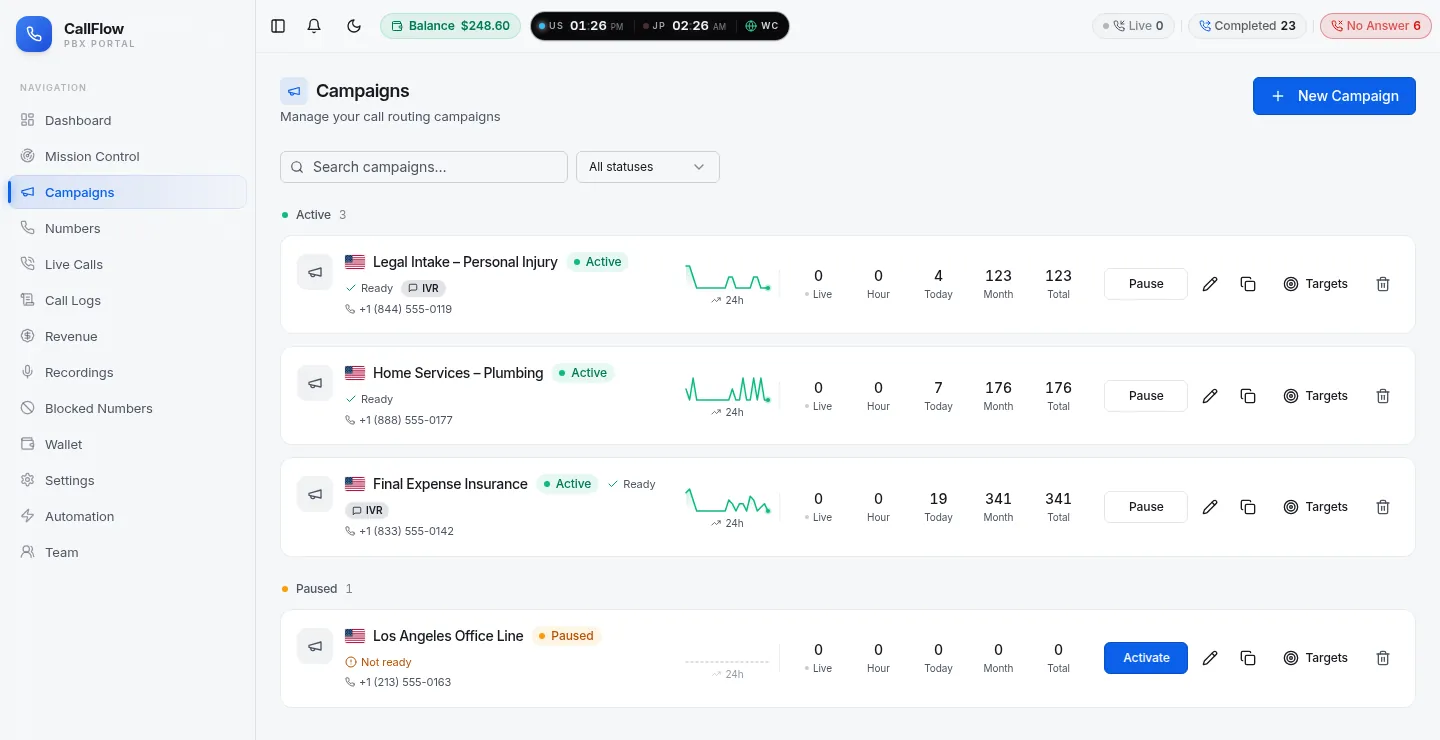
Numbers, campaigns and forwarding rules in one place
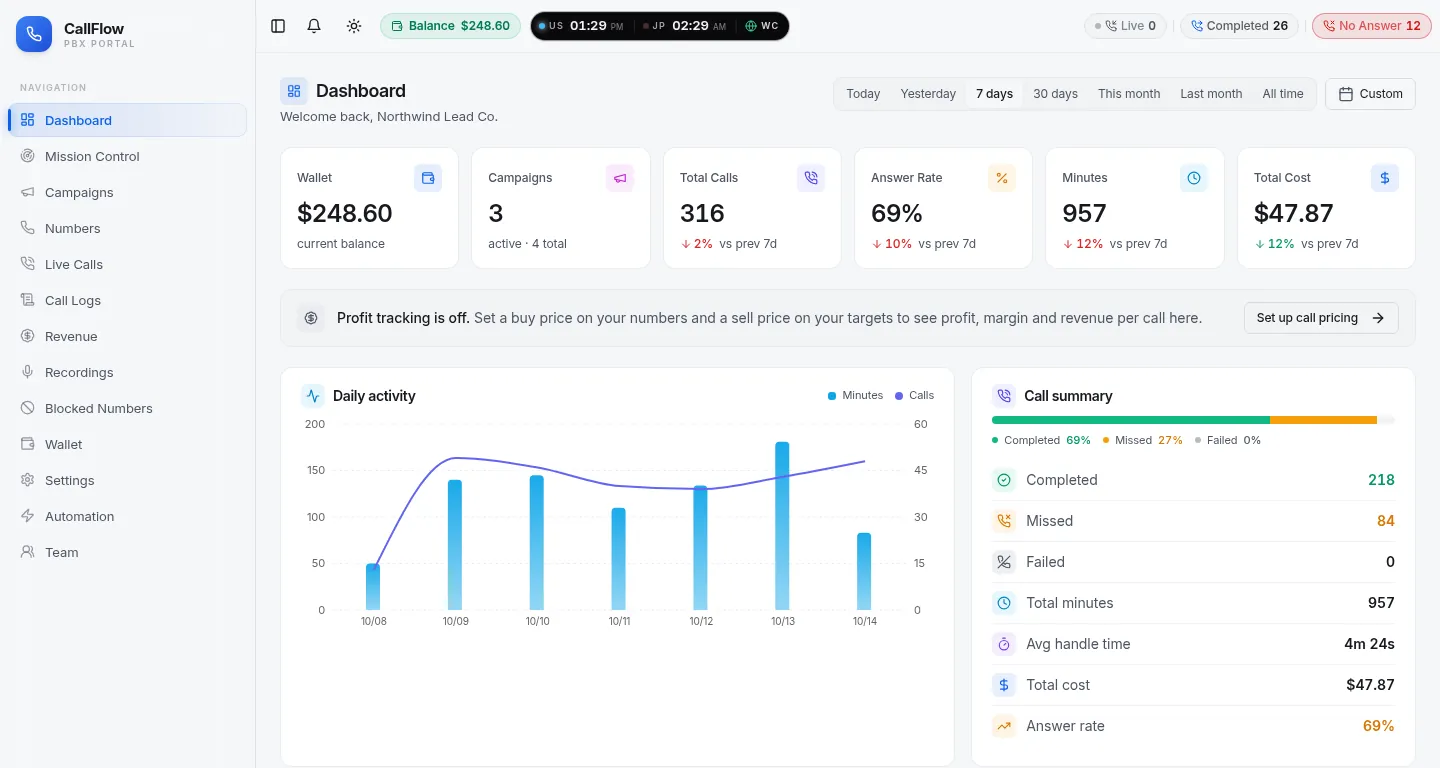
Real screens from a CallFlow account (demo data). A campaign is the unit everything hangs off: it owns the numbers and the list of destinations.
How it works
From dialled number to answered call
A toll-free call passes through Call Protection first, then the campaign decides which destination should ring, in what order, and for how long.
- 1
Pick a number
Search the inventory by prefix and digits. The number is yours as soon as the order completes and appears on the Numbers page.
- 2
Create a campaign
Name it, choose sequential or simultaneous ringing, set the ring time and attach the number. One campaign can carry several numbers.
- 3
Add destinations
Add phones, SIP destinations or agents as targets with a weight, a priority tier, caps and opening hours in your time zone.
- 4
Switch on protection
Turn on Spam Shield rules and, if the number is public, the press-a-digit IVR. Then watch the first calls arrive in Mission Control.
Destinations
Forward a toll-free number to a phone, a PBX or a browser
Every destination type takes part in the same weights, priorities, caps and schedules, so you can start with a mobile phone and add a PBX later without rebuilding the campaign.
Any phone number
A mobile, an office line, an answering service. The caller's number is shown as the caller ID, so the person answering sees who is calling, not your toll-free number.
- No equipment or app to install
- Different phones for different hours
- No-answer failover to the next phone in line
Your PBX or dialer over SIP
Point a target at a SIP destination on your own PBX, contact-centre platform or dialer. CallFlow sends the call to your host and port, and the dialled toll-free number travels with it so your system can route internally.
- Plain SIP to an IPv4 host and port
- The dialled number is passed as the SIP user part
- Same caps, weights and hours as a phone target
Agents in a browser
Give team members an agent extension and they answer calls in the browser with a headset. Put several agents in an extension group to ring them all at once and connect the first to pick up.
- No softphone download for the agent
- Extension groups for simultaneous ringing
- Agents see only their own calls and recordings
Call Protection
A public toll-free number attracts robocalls. Plan for it.
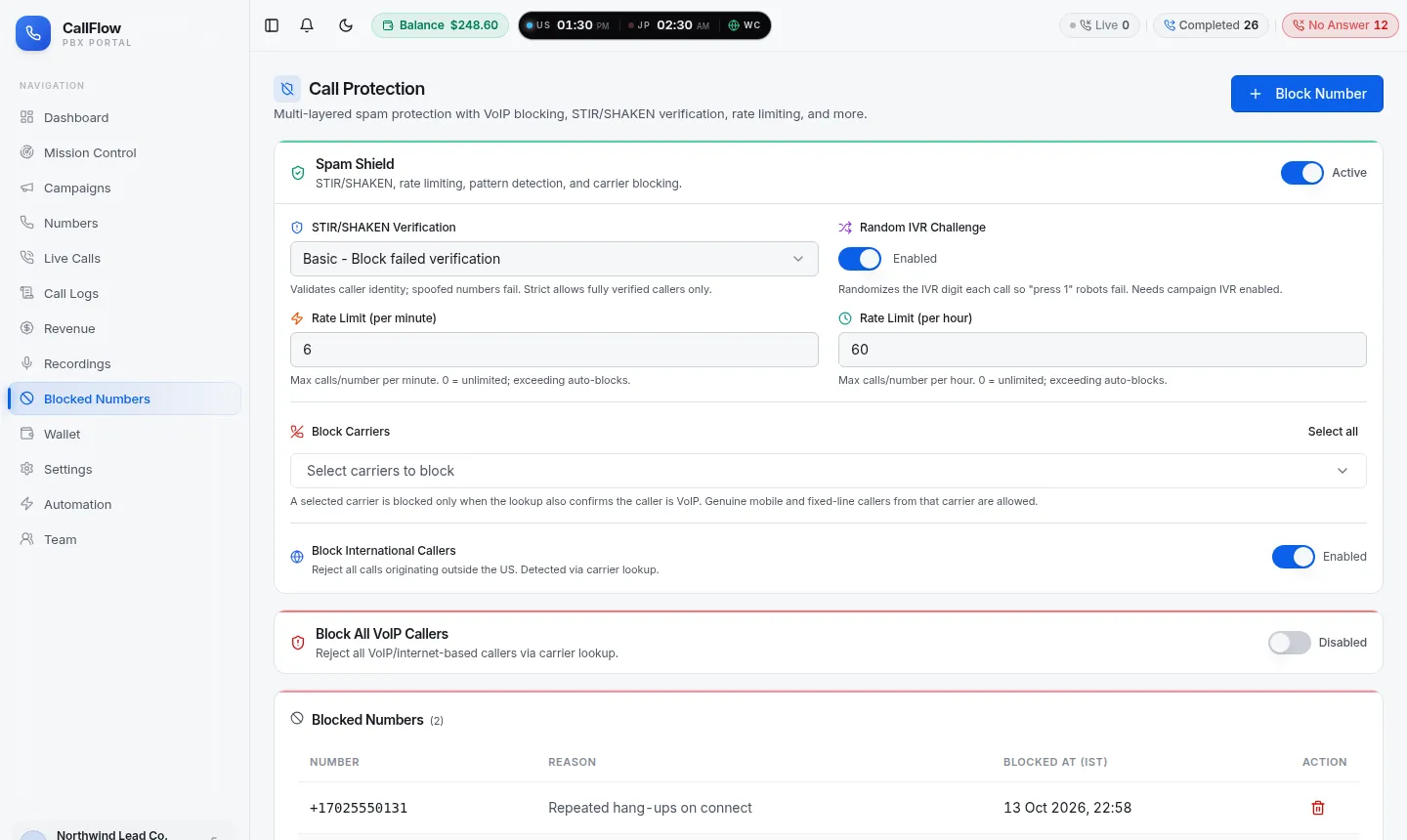
Toll-free numbers are harvested and dialled by machines at scale. Call Protection is switched on per account and runs before any destination rings.
- STIR/SHAKEN attestation: choose how strictly unsigned or weakly attested calls are treated.
- Rate limits: cap how often one caller can reach you per minute and per hour.
- Block lists: block specific numbers with a reason, and optionally all VoIP or all international callers.
- Press-a-digit screen: a spoken prompt and a required key press, with a random digit per call if you want it. Details on the IVR call forwarding page.
Blocked and rate-limited calls never ring a destination, so an after-hours flood of auto-dialer calls does not wake up the on-call phone.
Who it is for
Where toll-free forwarding earns its keep
Multi-location businesses
One advertised toll-free number, forwarded to each branch during its own opening hours and to a central desk or answering service outside them.
Agencies and lead generators
A separate toll-free number per client or campaign, each forwarding to that client's phone, with call logs and recordings the client can see in a buyer login.
Remote and part-time teams
Agents answer in the browser from wherever they are; simultaneous ring groups make sure the first free person picks up, and caps stop anyone from being flooded.
Businesses moving off a desk phone system
Keep the toll-free number public, forward it to the existing PBX over SIP today, and move individual departments to phones or browser agents when it suits you.
Toll-free or local?
Both forward the same way; the difference is what the caller sees
CallFlow sells both. Many accounts run a toll-free number for the national line and local numbers for individual markets, all forwarding to the same team.
| Toll-free number | Local number | |
|---|---|---|
| Who pays for the call | You do; the caller is never charged | The caller's normal local or mobile tariff |
| What the number signals | A national business, free to call from anywhere in the country | A presence in a specific city or area code |
| Prefixes available | 800, 833, 844, 855, 866, 877, 888 | US area codes, chosen by state and city |
| Forwarding, routing, protection | Identical: the same campaign and target controls | Identical: the same campaign and target controls |
| Typical use | Advertised support and sales lines, national campaigns | Local service areas, per-city ad campaigns |
Need a number outside the US? UK, Australian, Japanese and Irish numbers are provided on request from the Numbers page, and forward through the same campaigns. Recordings, when switched on, follow the number too and are removed after ten days ( Recordings page).
FAQ
Toll-free call forwarding questions
What businesses ask before they move a toll-free number onto CallFlow.
How quickly is a toll-free number live?
Numbers are picked from live inventory inside the portal and are attached to your account the moment the order completes. You can put a number on a campaign and forward it to a phone straight away. New toll-free numbers can take a few hours to become dialable from every carrier in the country, which is normal for the toll-free network and nothing you need to configure.
Which toll-free prefixes can I choose from?
All seven North American toll-free prefixes: 800, 833, 844, 855, 866, 877 and 888. The number search lets you filter by prefix and by digits the number should contain, so you can find a memorable pattern without paying for a vanity-number service.
Where can calls be forwarded to?
To any phone number, to your own PBX or dialer over SIP, or to agents answering in their browser. A campaign can mix all three, and you can set weights, priorities, concurrent-call caps, daily caps and opening hours per destination.
Can one toll-free number ring more than one phone?
Yes. Add several targets to the campaign. Sequential mode rings them in priority order and moves to the next one when a target does not answer within the ring time; simultaneous mode rings a group of agents at once and connects the first to pick up.
What happens to calls outside business hours?
Each target has its own opening hours and optional start and end dates. Calls arriving when a target is closed skip it and go to the next eligible one, so an after-hours answering service or an overflow desk can sit behind the daytime team without any manual switching.
How do you keep robocalls off a toll-free number?
Call Protection runs per account: STIR/SHAKEN attestation checks, per-caller rate limits, a block list with reasons, optional blocking of VoIP or international callers, and a press-a-digit IVR challenge that can randomise the digit on every call so auto-dialers cannot learn it.
Are forwarded calls recorded?
Recording can be switched on per account. Recordings are available in the portal and to buyers you allow, and they are deleted automatically after ten days from both the server and cloud storage.
Do I need a contract or a subscription?
No. You open a free account, fund a wallet and usage is drawn from it as it happens, with every charge itemised in your call logs and transaction history. Numbers can be released from the portal when you no longer need them.
From the blog
Guides on toll-free call forwarding
Longer reads from the CallFlow team on the same topic: setup walkthroughs, pitfalls and worked examples.
- Toll-free call forwarding: setup, routing rules, pitfalls
- Toll-free numbers: what they are, how they work, how to set one up
- How to get a vanity toll-free number (and when it's worth it)
- 833 vs 800 numbers: what actually matters
- Local vs toll-free number: how to choose for multi-state calls
- How to manage multiple toll-free numbers for your business
More from CallFlow
The rest of the platform
Call Forwarding Portal
Numbers, campaigns, live calls, recordings, billing and team access in one signed-in portal.
OverviewPay-Per-Call Tracking
A tracking number per source, buyers with caps and weights, duplicate rules, buyer logins and reports that send themselves.
Learn moreIntelligent Call Routing
Priority tiers, weights scaled to live capacity, schedules, no-answer failover, a hold queue and routing that learns from answer rates.
Learn moreIVR Call Forwarding
A custom prompt and one required key press that keeps robocalls and auto-dialers away from your team and your buyers.
Learn moreSee it with your own numbers
Open a free account and set up toll-free call forwarding in a few minutes, or book a short demo and we will walk through your routing with you.