For pay-per-call networks, publishers and buyers
Pay-per-call tracking software built around the buyer, not the spreadsheet
Give every traffic source its own tracking number, set each buyer up as a destination with caps and a weight, and let the call log do the reconciliation: which campaign, which buyer, how long, how it ended, and whether the caller had called before. Buyers get their own login; reports go out by email on a schedule.
Free account · no subscription or contract · usage drawn from a prepaid wallet
- A toll-free or local tracking number per source, publisher or ad group
- Buyers as targets with concurrent, hourly, daily and total caps
- Weights and priority tiers decide who gets the next call
- Duplicate-caller rules with a look-back window in days
- Recordings, live calls and a separate buyer portal
- Signed webhooks, REST API, Zapier and native CRM sync
Attribution
The dialled number is the attribution
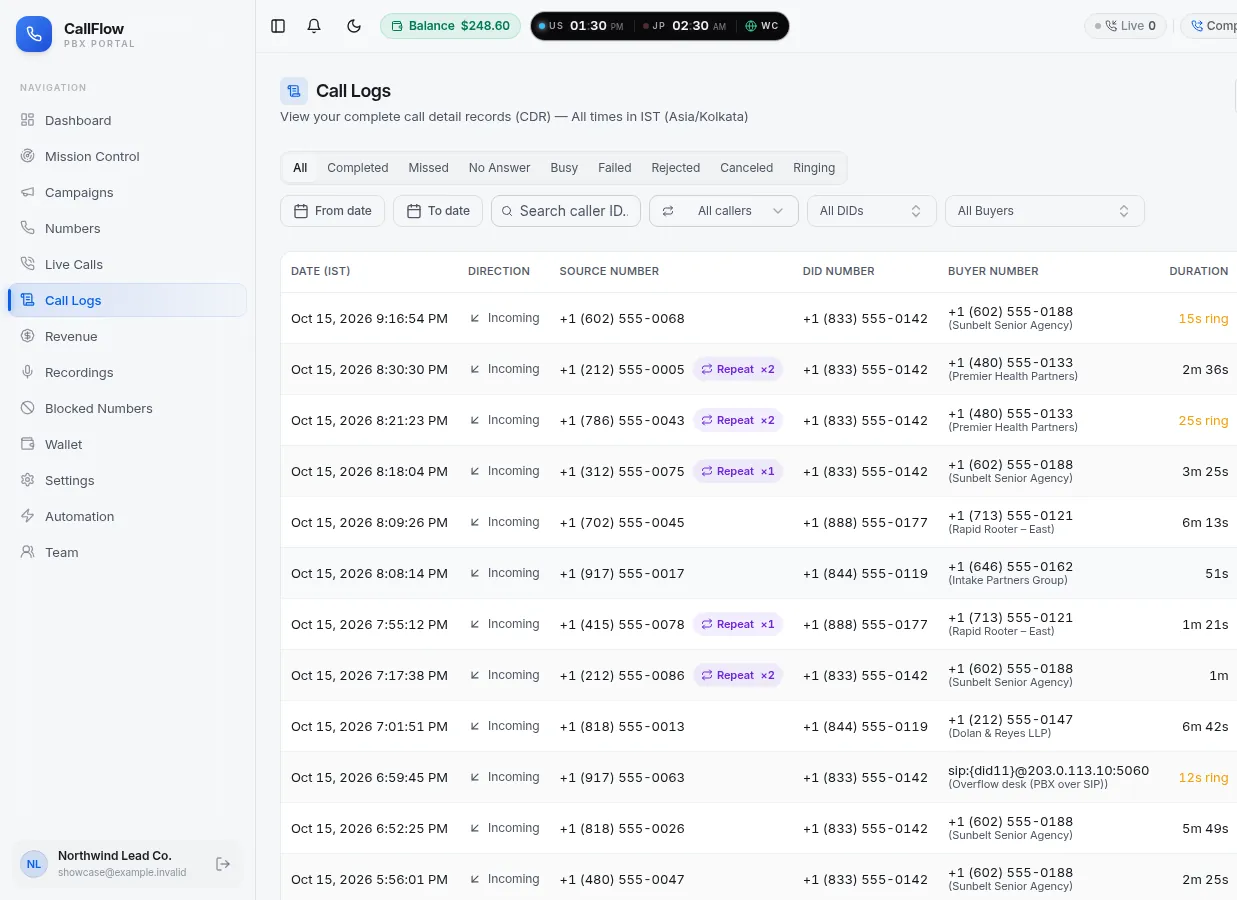
Each campaign owns its numbers, so there is nothing to tag and nothing to reconcile afterwards: the call log row already says which source produced the call and which buyer took it.
- Caller number, number dialled and the buyer it was forwarded to, on every row
- Ring time, talk time and the outcome: completed, no answer, busy, failed or rejected
- A repeat marker with the count of earlier calls from the same caller
- Filters by outcome, date range, number and buyer; export to CSV or XLSX
- Recordings next to the row when recording is switched on
How it fits together
Sources on the left, buyers on the right, the call record at the end
A campaign is the clearing house. It owns the tracking numbers, holds the duplicate rule and the ring settings, and distributes calls across the buyer targets within their caps.
- 1
Buy a number per source
One toll-free or local number for each publisher, ad group or landing page. Search by prefix and digits; the number is live as soon as the order completes.
- 2
Create the campaign
Attach the numbers, choose sequential or simultaneous routing, set the ring time, and pick how repeat callers should be treated.
- 3
Add buyers as targets
Each buyer is a phone, SIP or browser destination with a weight, a priority tier, caps that reset automatically and opening hours.
- 4
Reconcile from the log
Dashboards split unique callers from repeats per campaign; the Automation page emails each buyer their own report daily.
Buyer controls
Every promise you make a buyer is a setting on their target
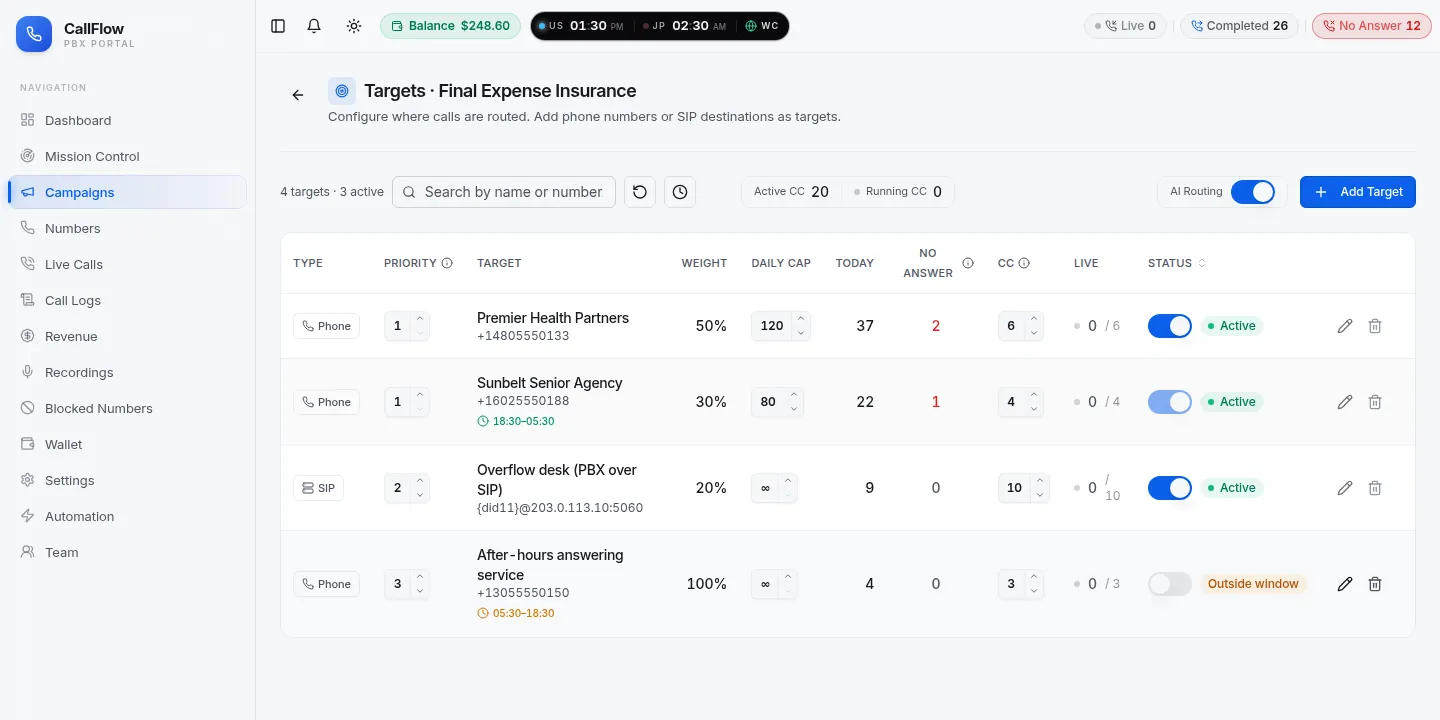
Caps and weights are enforced by the router on every call, and the live count against each cap is visible on the targets page, so a buyer's 'you sent me too many' can be checked in seconds.
Concurrent-call cap
The most calls a buyer can be on at once. The router counts live legs, so a buyer with four lines never receives a fifth call that would ring out.
Hourly, daily and total caps
Daily caps reset at the start of each business day, hourly caps every hour, and a total cap closes the target when a contract amount is reached.
Weights and priority tiers
Share traffic 60/40 between two buyers in the same tier, keep a backup buyer in tier 2 who only sees calls tier 1 could not take.
Schedules per buyer
Daily opening hours or a dated window per target. A buyer that closes at six simply drops out of the rotation at six.
Duplicate handling
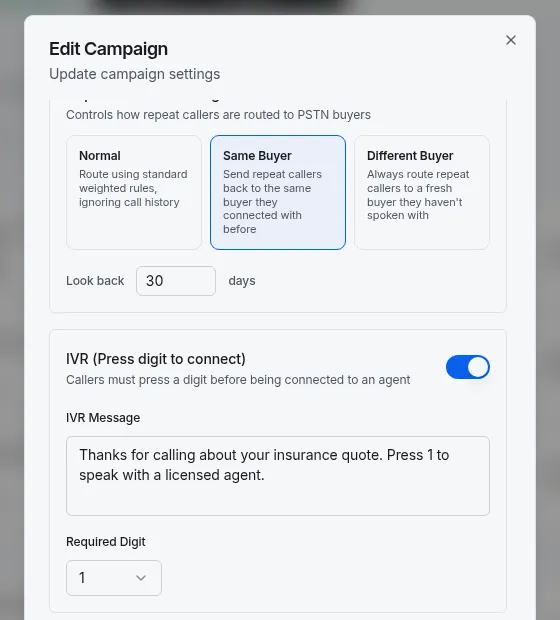
Per campaign: route repeats normally, send them back to the buyer they reached before, or always to a different buyer, within a look-back window you choose.
Queue and overflow
When every buyer is at capacity the caller can hold while the campaign keeps looking for a free line, instead of hearing a busy tone.
Duplicates
Decide what a repeat caller is worth before the buyer does
Repeat callers are the usual cause of payout disputes. CallFlow marks them in the log and lets you choose, per campaign, what routing should do with them.
- Normal
- Repeat callers are routed by the ordinary weights and caps. Use it when every call is billable regardless of history.
- Same buyer
- A caller who comes back inside the look-back window is sent to the buyer they reached last time, so the follow-up lands with the agent who already has the file.
- Different buyer
- Repeat callers always go to a buyer they have not spoken to, which protects buyers who pay only for fresh callers.
The look-back window is set in days per campaign. Repeat counts on the call log and the unique-versus-duplicate split on the dashboard use the same window, so what you see is what the router did.
Reporting and the buyer portal
Numbers you can send to a buyer without editing them first
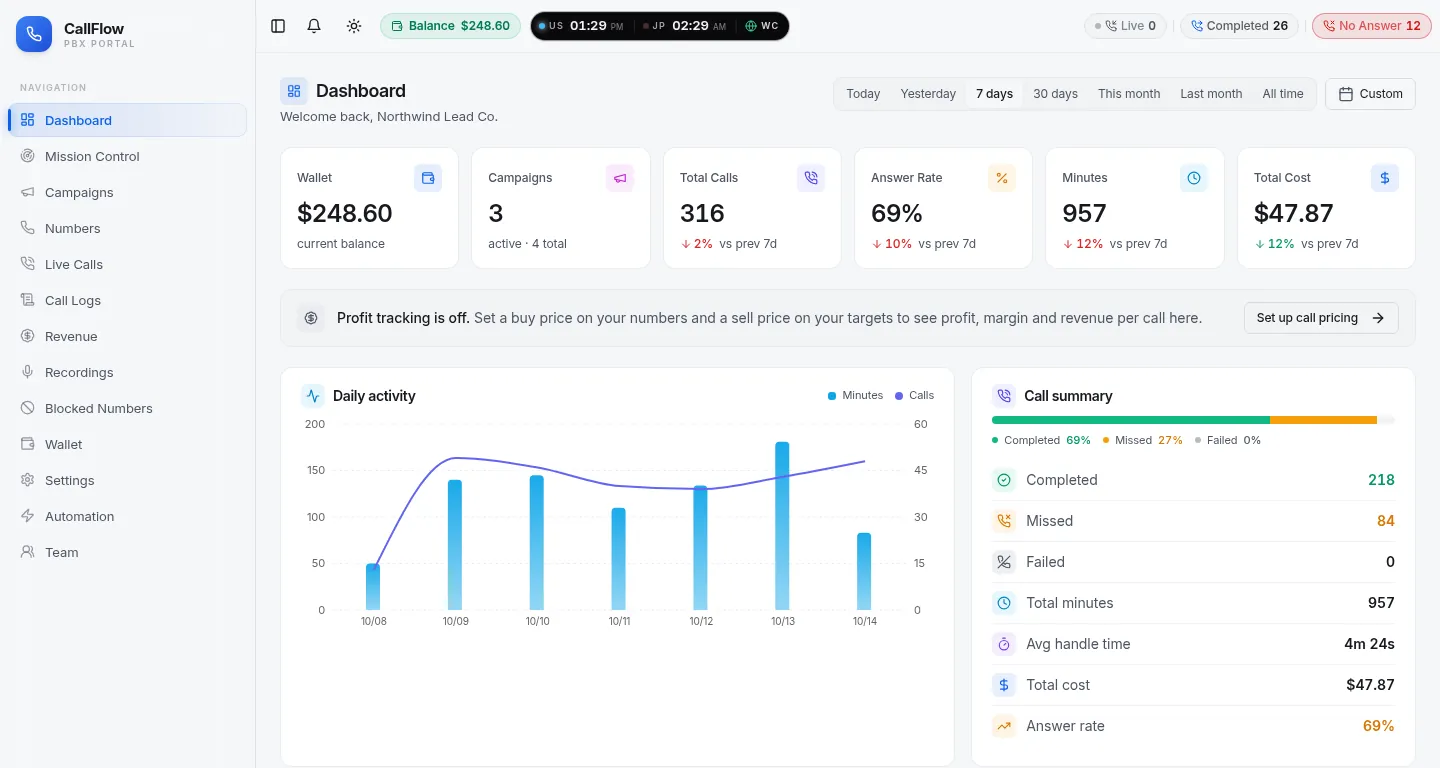
Dashboards, the Revenue page and scheduled buyer reports are all built from the same call log, so the number the buyer sees in their portal is the number you see in yours.
Revenue page
Set a buy price on your numbers and a sell price on your targets, and the Revenue page shows revenue, cost, profit and margin per call and per campaign.
Buyer portal
Buyers sign in separately and see only their calls, their live calls, their recordings if you allow it, and their own targets and wallet. You can hide your tracking numbers from a buyer so they never learn where the calls came from.
Scheduled buyer reports
The Automation page builds a buyer's call report for a date range on demand, or emails it every day on a schedule you set.
Marketplace
Publish call offers and let buyers request them. A fulfilled offer becomes an ordinary target, so routing, caps and reporting behave exactly as for buyers you bring yourself.
Integrations
Get every call into the systems you already run
Call events can be pushed as they happen or pulled on your schedule; nothing on this page depends on a browser dialer or a plug-in.
Signed webhooks
Call started, completed, recording-ready and disposition events delivered to your endpoint with a signature you can verify, and retried with back-off if your server is down.
REST API
List calls and campaigns, open a single call with its recording link, set a disposition such as Sale or No sale from your own tooling, and manage webhook endpoints.
API documentationZapier and GoHighLevel
Both connect through the webhook integration, so a completed call can create a contact, update a pipeline stage or trigger a text without code.
HubSpot, Salesforce and Zoho
Native sync: connect the CRM once and each call is logged as a call activity on the matching contact, updated later with the recording and the disposition.
Routing itself is covered on the intelligent call routing page, and the press-a-digit screen that keeps auto-dialers away from buyers on the IVR call forwarding page.
FAQ
Pay-per-call tracking questions
The questions networks and buyers ask when they evaluate call tracking.
How does call tracking attribute a call to a campaign?
Each campaign owns its own toll-free or local number, so the dialled number is the attribution. Give each traffic source, publisher or ad group its own number and every call log row already carries the campaign, the caller, the buyer it was sent to, how long it lasted and how the far end answered.
Can I cap what each buyer receives?
Yes, per buyer target: a concurrent-call cap, a daily cap, hourly and total caps, and a weight for how the remaining traffic is shared. Caps reset automatically and the live count against each cap is visible on the targets page.
How are duplicate callers handled?
Per campaign you choose how repeat callers within a window of days are treated: route them normally, send them back to the buyer they reached last time, or always send them to a different buyer. Dashboards separate unique callers from repeats so you can see duplicates before a buyer disputes them.
Do buyers get their own login?
Yes. Buyers sign in to a separate buyer portal that shows only their calls, live calls as they happen, their recordings if you allow access, and their own targets and wallet. You can hide your tracking numbers from a buyer, so they never learn which sources the calls came from.
Can buyer reports be sent automatically?
The Automation page generates a buyer's call report on demand or on a daily schedule and emails it to the buyer, so the morning reconciliation email writes itself.
How do I get calls into my CRM?
Signed webhooks fire when a call starts, completes, gets a recording or a disposition; a REST API reads calls and campaigns and sets dispositions; Zapier and GoHighLevel connect through the webhook integration; and HubSpot, Salesforce and Zoho sync natively once you connect them.
What is the marketplace?
Sellers can publish call offers and buyers with a marketplace account can request to purchase them. Fulfilled offers become ordinary campaign targets, so routing, caps and reporting work the same way as for buyers you bring yourself.
From the blog
Guides on pay-per-call tracking
Longer reads from the CallFlow team on the same topic: setup walkthroughs, pitfalls and worked examples.
- Pay-per-call campaign setup for multi-buyer routing
- How to configure pay-per-call targets: routing, caps, examples
- Duplicate call suppression for pay-per-call
- Call tracking: how it works and setup guide
- Call analytics: metrics, setup, and real examples
- Best call forwarding software for affiliate marketers
More from CallFlow
The rest of the platform
Call Forwarding Portal
Numbers, campaigns, live calls, recordings, billing and team access in one signed-in portal.
OverviewToll-Free Call Forwarding
Pick an 800-series number and forward it to phones, SIP trunks or browser agents, with hours, caps and failover per destination.
Learn moreIntelligent Call Routing
Priority tiers, weights scaled to live capacity, schedules, no-answer failover, a hold queue and routing that learns from answer rates.
Learn moreIVR Call Forwarding
A custom prompt and one required key press that keeps robocalls and auto-dialers away from your team and your buyers.
Learn moreSee it with your own numbers
Open a free account and set up pay-per-call tracking in a few minutes, or book a short demo and we will walk through your routing with you.